Premountingv4.0.140
Remotion only ever renders the current frame.
This means when a video or another asset is about to come up, it is not loaded by default.
Even though the video is soon about to appear, it is not yet loaded because Remotion only ever renders the current time.
What is premounting?
Premounting is the practice of mounting a component containing assets earlier to allow assets some time to load before they appear.
The video is mounted earlier to give it some time to load.
It carries the style opacity: 0 to make it invisible.
It's time defined by useCurrentFrame() is frozen at 0.
Default premount durationv4.0.534
Set defaultPremountInSeconds to premount timed components that do not specify premountFor. The default is 0 seconds in v4 and 2 seconds in v5.0.
The duration is converted to frames using the composition FPS and rounded to the nearest frame.
For the Studio, use Config.setDefaultPremountInSeconds(), the --default-premount-in-seconds CLI flag, or the Studio settings. The empty template sets 2 seconds in its config file.
For the Player, use the defaultPremountInSeconds prop.
Explicit premountFor values take precedence, including premountFor={0}. Sequences with layout="none" do not use the default premount duration.
Premounting components
Use premountFor to set the number of frames a component premounts for.
When omitted, the default premount duration applies. Pass premountFor={0} to disable premounting for a component.
<Video> and <Audio> from @remotion/media accept premountFor directly from v4.0.495. They remain layoutless, carry display: none while premounted and register the premounted range in the Studio timeline.
The number you pass is the number in frames you premount the component for.
Premounted.tsxconstMyComp :React .FC = () => { return ( <Video from ={100}premountFor ={100}src ={staticFile ('bigbuckbunny.mp4')} /> ); };
In the Remotion Studio, a premounted component is indicated with diagonal stripes:
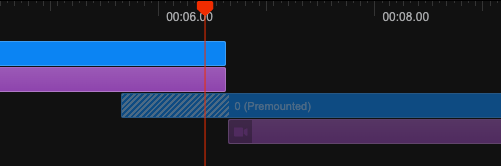
A premounted <Sequence> does carry the styles opacity: 0 and pointer-events: none.
It is not possible to premount a <Sequence> with layout="none" because such a sequence does not have a container to apply the styles to.
Premounting visual componentsv4.0.528
You can pass premountFor directly to these components:
<AbsoluteFill>,InteractiveHTML and SVG components,<HtmlInCanvas>and<Solid>.- Shape components,
<MacOSCursor>and rough-notation components. <Lottie>,<RemotionRiveCanvas>,<ThreeCanvas>and<ThreeWebGPUCanvas>.
These components keep their existing layout while premounted, with opacity: 0 and pointerEvents: 'none'. Their local frame stays at the first frame until from is reached.
PremountedScene.tsximport {AbsoluteFill ,Img ,staticFile } from 'remotion'; export constPremountedScene :React .FC = () => { return ( <AbsoluteFill from ={60}durationInFrames ={90}premountFor ={30}> <Img src ={staticFile ('logo.png')}width ={200} /> <h1 >Welcome</h1 > </AbsoluteFill > ); };
The image and heading mount together at frame 30, become visible at frame 60, and unmount at frame 150.
When premountFor is omitted, the default premount duration applies.
Use styleWhilePremounted to override styles while premounted, including the default hiding styles.
Premounting only applies in the Player and Studio, not during rendering. A parent must also be mounted for its children to premount; set premountFor on the outer timed component when preparing a whole scene.
<Img>, <AnimatedImage> and <Gif> also support direct premounting. See their API pages for availability and behavior.
With <Series> and <TransitionSeries>
premountFor is also available on <Series.Sequence> and <TransitionSeries.Sequence>.
It is not yet possible to premount a whole <Series> or <TransitionSeries>.
For custom components, see Make a component interactive.
Usage together with the buffer state
If you also use the buffer state, <Video> and <Audio> from @remotion/media, as well as <Html5Audio>, <Html5Video>, <OffthreadVideo>, and <Img>, are aware of premounting and don't trigger the buffer state while in a premounted <Sequence>.
Otherwise it would lead to pausing playback while a scene is not even visible yet.